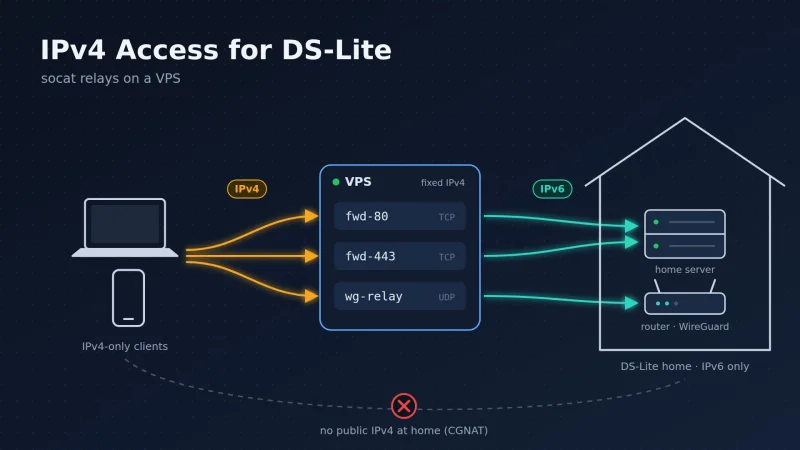
IPv4 Access for DS-Lite Connection with socat Relays on a VPS
This guide describes how a home network behind a DS-Lite DSL connection is made reachable via IPv4. It uses a small VPS with a fixed public IPv4 address and three socat services:
| Service | Protocol | Purpose |
|---|---|---|
fwd-80 | TCP 80 | Forwards HTTP from IPv4 to the home server via IPv6 |
fwd-443 | TCP 443 | Forwards HTTPS from IPv4 to the home server via IPv6 |
wg-relay | UDP 51820 | Forwards WireGuard from IPv4 to the FRITZ!Box via IPv6 |
The Problem
With DS-Lite (Dual-Stack Lite), the provider gives the connection a public IPv6 prefix only. IPv4 traffic is tunneled to the provider and leaves the internet through a carrier-grade NAT (AFTR) that many customers share. As a result:
- No incoming IPv4 connections are possible. There is no public IPv4 address of your own, so IPv4 port forwarding on the FRITZ!Box does nothing.
- Incoming connections only work via IPv6. Clients that only have IPv4 (many hotel and café Wi-Fi networks, trains, corporate guest networks, some mobile networks) cannot reach the home network at all.
- The IPv6 prefix changes every night (here: around 3 a.m.), so all public IPv6 addresses in the home network change as well.
The Solution
A VPS has what the home connection lacks: a fixed public IPv4 address. It also has IPv6. socat on the VPS accepts connections on IPv4 and opens a matching connection via IPv6 to the home network:
flowchart LR
    C1[Web client<br/>IPv4 only] -->|TCP 80/443| V
    C2[iPhone WireGuard<br/>any network] -->|UDP 51820| V
    V[VPS<br/>fixed public IPv4<br/>fwd-80 / fwd-443 / wg-relay]
    V -->|TCP via IPv6<br/>ddns-server.example.com| S[Home server<br/>Caddy]
    V -->|UDP via IPv6<br/>xxxxxx.myfritz.net:51871| F[FRITZ!Box<br/>WireGuard server]
C3[Web client<br/>with IPv6] -->|TCP 80/443 directly| S- Clients with IPv6 reach the home server directly via its AAAA record.
- Clients with IPv4 only reach the VPS via the A record. The VPS forwards the connection via IPv6.
- The iPhone always connects to the VPS. The VPS forwards the WireGuard packets to the FRITZ!Box via IPv6. The WireGuard encryption stays end-to-end between iPhone and FRITZ!Box.
Why socat and not iptables DNAT? Linux cannot NAT from IPv4 to IPv6 (no NAT46) in the kernel. A userspace relay such as socat terminates the IPv4 connection and opens a new IPv6 connection, so the address family no longer matters.
Prerequisites
- VPS running Debian/Ubuntu with a fixed public IPv4 and working IPv6, e.g. a Netcup VPS pico. Root or sudo access.
- FRITZ!Box with FRITZ!OS 7.50 or later (tested with a FRITZ!Box 7590 / FRITZ!OS 8.25), MyFRITZ! enabled.
- Home server running the web services (here: Caddy as reverse proxy) with a stable IPv6 interface ID (EUI-64 or a fixed token, no privacy/temporary address).
- A DynDNS client on the home server that keeps the AAAA record of its hostname up to date.
Part 1: DNS Records
The web services use one hostname, here ddns-server.example.com, with two records:
| Record | Value | Maintained by |
|---|---|---|
| A | Public IPv4 of the VPS | Static, entered once at the DNS provider |
| AAAA | Public IPv6 of the home server | DynDNS client on the home server |
Important: the AAAA record must point to the home server’s own IPv6 address, not to the FRITZ!Box. IPv6 has no port forwarding. The FRITZ!Box only opens its firewall for the server’s address.
Use a short TTL for the AAAA record (60–300 s), so that clients and the VPS pick up the new address quickly after the nightly prefix change.
The WireGuard relay uses the MyFRITZ! address of the FRITZ!Box itself, e.g. xxxxxx.myfritz.net. The FRITZ!Box keeps it up to date.
Check on the VPS:
dig +short A    ddns-server.example.com   # -> VPS IPv4
dig +short AAAA ddns-server.example.com   # -> IPv6 of the home server
dig +short AAAA xxxxxx.myfritz.net # -> IPv6 of the FRITZ!BoxMyFRITZ! names may also return an A record pointing to the provider’s shared DS-Lite IPv4 address. This is harmless here because all relays use TCP6:/UDP6: and therefore only query the AAAA record.
Part 2: FRITZ!Box Settings
- IPv6 port forwarding to the home server: Internet → Permit Access → Port Forwarding → select the home server → allow 80 and 443 with IPv6 enabled. IPv4 forwarding is pointless with DS-Lite. Check that the IPv6 interface ID shown there matches the server’s stable address.
- WireGuard connection for e.g. the iPhone: Internet → Permit Access → VPN (WireGuard) → Add VPN Connection → single device. Note the WireGuard port from the generated configuration (here
51871).
Part 3: Install socat on the VPS
sudo apt install socat -yMake sure the ports are not in use by anything else:
sudo ss -tulpn | grep -E ':(80|443|51820)\b'Part 4: HTTP/HTTPS Forwarding (fwd-80, fwd-443)
Create /etc/systemd/system/fwd-80.service:
[Unit]
Description=TCP forward IPv4:80 -> home server (IPv6)
After=network-online.target
Wants=network-online.target

[Service]
ExecStart=/usr/bin/socat TCP4-LISTEN:80,fork,reuseaddr TCP6:ddns-server.example.com:80
Restart=always

[Install]
WantedBy=multi-user.target
Create the service for port 443 from it:
sed 's/80/443/g' /etc/systemd/system/fwd-80.service | sudo tee /etc/systemd/system/fwd-443.serviceEnable and start both:
sudo systemctl daemon-reload
sudo systemctl enable --now fwd-80 fwd-443
What the options do:
TCP4-LISTEN:80: accepts connections on the VPS’s public IPv4 address.fork: starts one child process per incoming connection.reuseaddr: allows an immediate restart without waiting for old sockets.TCP6:ddns-server.example.com:80: connects to the home server via IPv6.
TCP6: is mandatory. The A record of ddns-server.example.com points to the VPS itself. With TCP: socat could pick the IPv4 address and send the connection back to itself in a loop. TCP6: only uses the AAAA record.
TLS is not terminated on the VPS. socat only passes the TCP stream on, so HTTPS stays end-to-end encrypted between client and Caddy, and Caddy keeps handling the certificates (including Let’s Encrypt HTTP-01 challenges via port 80).
Nightly IPv6 change: Because of fork, socat resolves the hostname for every new connection. After the prefix change, new connections automatically go to the new address as soon as the DynDNS record is updated. No restart is required.
Part 5: WireGuard Relay (wg-relay)
Create /etc/systemd/system/wg-relay.service:
[Unit]
Description=UDP relay IPv4 -> FRITZ!Box WireGuard (IPv6)
After=network-online.target
Wants=network-online.target

[Service]
ExecStart=/usr/bin/socat -T 600 UDP4-LISTEN:51820,fork,reuseaddr UDP6:xxxxxx.myfritz.net:51871
Restart=always

[Install]
WantedBy=multi-user.target
sudo systemctl daemon-reload
sudo systemctl enable --now wg-relayUDP4-LISTEN:51820: accepts WireGuard packets from clients on the VPS’s IPv4 address.UDP6:xxxxxx.myfritz.net:51871: forwards them to the FRITZ!Box WireGuard port via IPv6.-T 600: ends a session after 10 minutes without traffic.
The FRITZ!Box remains the WireGuard server. The VPS only sees encrypted packets.
Part 6: Restart the WireGuard Relay on an IPv6 Change
Unlike TCP, a UDP “session” in socat never ends as long as packets keep flowing. The iPhone sends a keepalive every 25 seconds, so after the nightly prefix change the relay would keep sending to the old FRITZ!Box address. A small script therefore restarts wg-relay when the FRITZ!Box’s AAAA record changes.
Create /usr/local/bin/wg-ipv6-check.sh:
#!/bin/bash
# Restart the WireGuard UDP relay if the FRITZ!Box's IPv6 has changed
PATH=/usr/local/sbin:/usr/local/bin:/usr/sbin:/usr/bin:/sbin:/bin

RELAY=wg-relay
HOST=xxxxxx.myfritz.net     # same hostname as in wg-relay.service
STATE_FILE=/var/lib/wg-ipv6-check/last_ip

mkdir -p "$(dirname "$STATE_FILE")"

# Current IPv6 from DNS (first AAAA record)
NEW_IP=$(dig +short AAAA "$HOST" | grep ':' | head -n1)

# Don't touch anything if the DNS lookup failed
[ -z "$NEW_IP" ] && exit 0

# First run: just remember the IP, no restart
if [ ! -f "$STATE_FILE" ]; then
    echo "$NEW_IP" > "$STATE_FILE"
    logger -t wg-ipv6-check "Initial IPv6 stored: $NEW_IP"
    exit 0
fi

OLD_IP=$(cat "$STATE_FILE")

if [ "$NEW_IP" != "$OLD_IP" ]; then
    logger -t wg-ipv6-check "IPv6 changed: $OLD_IP -> $NEW_IP, restarting $RELAY"
    if systemctl restart "$RELAY"; then
        echo "$NEW_IP" > "$STATE_FILE"
    else
        logger -t wg-ipv6-check "Restart of $RELAY failed, will retry next run"
    fi
fi
Make it executable and run it every minute via root’s crontab (sudo crontab -e):
sudo chmod +x /usr/local/bin/wg-ipv6-check.sh* * * * * /usr/local/bin/wg-ipv6-check.shView the logs:
journalctl -t wg-ipv6-checkfwd-80 and fwd-443 do not need to be restarted (see Part 4).
Part 7: Firewall on the VPS
No NAT rules and no IP forwarding are needed. The iptables state of the VPS is minimal:
# iptables -S
-P INPUT ACCEPT
-P FORWARD DROP
-P OUTPUT ACCEPT
-A INPUT -p udp -m udp --dport 51820 -j ACCEPT

# ip6tables -S
-P INPUT ACCEPT
-P FORWARD DROP
-P OUTPUT ACCEPT
If the INPUT policy is set to DROP (recommended for hardening), allow at least SSH, TCP 80, TCP 443, UDP 51820 and established connections. Also check any cloud firewall at the VPS provider.
The kernel settings net.ipv4.ip_forward and net.ipv6.conf.all.forwarding can stay at 0, because socat is a normal userspace program and does not route packets.
Part 8: iPhone WireGuard Client
- Import the iPhone connection into the WireGuard app by scanning the QR code shown by the FRITZ!Box.
- Tap the tunnel → Edit → section Peer:
- Endpoint:
<VPS-IPv4>:51820 - Persistent keepalive:
25
- Endpoint:
- Optional, under On-Demand Activation: turn on Cellular and Wi-Fi, and set “Except these SSIDs” to your home Wi-Fi.
This single tunnel works in every network: mobile data, IPv6 Wi-Fi and IPv4-only Wi-Fi. No DynDNS entry for the FRITZ!Box and no DNS rebind exception are needed, because the endpoint is a fixed IPv4 address.
Part 9: Testing
On the VPS:
systemctl is-active fwd-80 fwd-443 wg-relay      # 3x "active"
sudo ss -tulpn | grep socat                      # listeners on 80, 443, 51820
curl -6 -I https://ddns-server.example.com       # home server reachable via IPv6
curl -4 -I http://<VPS-IPv4>                     # whole chain via IPv4
From outside, e.g. a phone on mobile data or a laptop in an IPv4-only network:
curl -4 -I https://ddns-server.example.comFor WireGuard, activate the tunnel in an IPv4-only network (check with test-ipv6.com). Latest handshake in the app should update every few seconds, and devices in the home network (e.g. http://192.168.178.1) should be reachable.
On the morning after a prefix change, journalctl -t wg-ipv6-check should show one restart with the new address.
Behavior on the Nightly IPv6 Change
| Component | What happens | Interruption |
|---|---|---|
fwd-80, fwd-443 | New connections resolve the updated AAAA record | Until the home server’s DynDNS update plus the DNS TTL |
wg-relay | Restarted by wg-ipv6-check.sh | Up to about 1 minute |
| Direct IPv6 clients | Use the updated AAAA record | Until the DynDNS update plus the DNS TTL |
Limitations
- The client’s IP address is lost. The home server sees the VPS’s IPv6 address as the source of all IPv4 visitors. Logs, fail2ban and IP-based rules therefore do not work for them. If needed, replace socat for 80/443 with HAProxy (
send-proxy-v2) and enable the PROXY protocol in Caddy (listener_wrappers→proxy_protocolwithallow <VPS-IPv6>/128, placed beforetls). - The VPS is a single point of failure for IPv4 clients. IPv6 clients are not affected.
- Plain HTTP between VPS and home runs unencrypted over the internet. This does not matter for HTTPS, and port 80 should only redirect to HTTPS anyway.
- Performance: socat copies data in userspace and forks one process per connection. This is fine for a private server but not meant for high traffic.
- Networks that block UDP (some corporate networks) cannot use WireGuard at all. Use mobile data there.
Troubleshooting
| Symptom | Cause | Solution |
|---|---|---|
curl -6 from the VPS to the home server fails | Missing IPv6 port forwarding, wrong interface ID, or outdated AAAA record | Check Part 2, compare dig AAAA with the server’s ip -6 addr |
| Web access via IPv4 hangs or loops | TCP: instead of TCP6: in fwd-*.service | Use TCP6: |
fwd-80/fwd-443 fail to start: Address already in use | Another service (e.g. a web server or container) uses port 80/443 on the VPS | ss -tlpn, stop the other service |
| WireGuard: no handshake via the VPS | wg-relay not running, UDP 51820 blocked by the (cloud) firewall, wrong FRITZ!Box port | systemctl status wg-relay, check firewall, compare the port with the FRITZ!Box config |
| WireGuard stops working after 3 a.m. | Relay still sends to the old IPv6 address | Check the cron job and journalctl -t wg-ipv6-check |
| Handshake OK, but home devices unreachable | Wrong AllowedIPs on the iPhone | Include 192.168.178.0/24 (or 0.0.0.0/0 for a full tunnel) |
| Captive portal does not load | On-Demand starts the tunnel before the Wi-Fi login | Turn the tunnel off, log in, turn it on again |
dig AAAA on a MyFRITZ! device name returns nothing, only an A record | MyFRITZ! returns the shared DS-Lite IPv4 for unknown names | Use the home server’s own DynDNS name (Part 1) |