Find everything you need to understand, use, and contribute to this project.
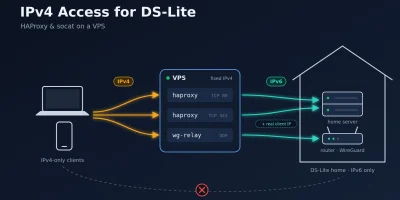
Make home services reachable via IPv4 with HAProxy (keeping the real client IP) and the FRITZ!Box WireGuard server with a socat relay on a VPS.
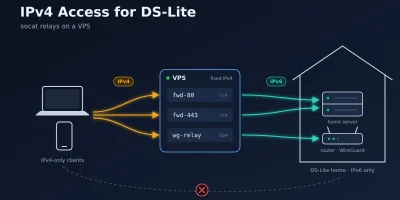
Make home services and the FRITZ!Box WireGuard server reachable via IPv4 using three small socat services on a VPS.
I run my server at home. The server is a $1. Access to the internet is provided by a FRITZ!Box 7590 via DSL. The LincStation has been equipped with following drives: - 1 NVMe with 512 GB storage as installation device for the Linux OS. - 2 SATA drives with 1 TB storage running as a ZFS storage pool. These drives are used for data that need to be protected from drive failures. The internal eMMC is currently not used in my setup. In future I might use it for a recovery image that I can boot from in case the NVMe is failing. As operating system I am running the latest Ubuntu 24.04 LTS. Please also refer to this section for further tools: - $1 - $1 Header photo by $1 on $1
The LinStation N1 comes with a license for the Unraid OS. Since I am not running Unraid but Ubuntu on my LincStation, there is a need to control the LEDs of the LincStation. Unfortunately, there is no LED driver or tool provided for Ubuntu, neither are there sources for the driver. What I did to solve this issue, is to reverse engineer the LincStation LED web-control application. The result is provided in this Codeberg git repository: $1. There is also a $1 describing how to build, use, and install the tool as a service. Header photo by $1 on $1
As the name says, my home server is running at home. This implies, that every now and then my internet service provide can decide to assign new IP addresses to my home network. My domains are registered at $1 which allows to control the DNS entries via an API. So what I did is to use $1 tool as in his repository $1. With the update script, particular subdomains’ IP addresses are being updated, which I reference for other subdomains on my home server via CNAME entries. The script is called regularly every 5 minutes by using a crontab entry: Header photo by $1 on $1
My preferred container system is docker. Docker allows to run multiple services in their own containers which makes maintenance much easier. The docker compose framework allows to create compose projects via simple configuration files. To install the docker framework including the compose plugin you just have to install the package with following command: Install Docker Compose After the installation the and the commands are available. To be able to execute commands without the command you have to add yourself to the group. This can be done with the following command: Allow User to Execute Docker Commands Replace with your username. You can test if docker can be called without by starting the docker hello world application: Run Docker Hello World If all went well, the hello-world image will be downloaded and you will see a hello world message from docker.
I use Caddy as reverse proxy and file server for the different services that I do provide on my server. Caddy is responsible to resolve the subdomains of your main domain and provide the services to your users. Caddy will also automatically take care to assign SSL certificates to your services. >[!note] > For a detailed documentation pleaser refer to the $1. To install Caddy on your server simply call Caddy uses per default as configuration file. This configuration file has following content after Caddy has been installed: When you open your web browser and type in the address of your server then Caddy will already show an example website. To get access to free SSL certificates, the needs to be extended by your email address. Please provide your email address as a first statement in the : >[!caution] > In the Caddyfile always use TABs to indent statements. Spaces...
No results found
Try a different search term